Valve's November 23, 2026 Steam Community Market update is live for everyone. For trading card sellers, two changes matter most: you can now change the price of a live listing without removing it and listing it again, and the new Market Home has a Steam Community Items section that features badges you haven't finished. The rest of the update adds a Watchlist, a list view, a dedicated My Listings page and simpler confirmations in the Steam Mobile App.
What changed in the November 2026 Market update?
The update rebuilt the Market Home page and changed how you track items and manage listings. Valve's announcement says everything is "live for everyone" with no opt-in. It's the second half of an overhaul that started in beta on May 12, 2026, which brought new item pages, bigger listing cards, dynamic filters and price graphs that show sales volume.
| Change | What it does | Matters for card sellers? |
|---|---|---|
| Reprice a listing | Change the price of a live listing in place | Yes: no more remove and relist |
| Steam Community Items | Cards, emoticons and backgrounds from games you play, with badges in progress | Yes: shows the cards you still need |
| My Listings and History page | Your listings and sales history get their own page, with a summary on Market Home | Yes: easier to manage many cheap listings |
| Updated Sell dialog | Uses the newer price graphs, works better on phones | Yes |
| Watchlist | Saves a listing, an item type with filters, or a search, with custom names | Somewhat: useful for cards you're waiting to buy |
| List view | A compact list instead of cards for search results and listings | Somewhat |
| Trending Items | Replaces Popular Items on Market Home, and is a new sort option | Mostly in-game items |
| Mobile confirmations | The Steam Mobile App confirms buys and sales inline | Only if you trade from your phone |
| Custom developer fees | Developers can set the fee on their game items | No change Valve has announced for cards |
Valve's other changes in the same update: Counter-Strike 2 containers show their possible contents, sorting by popularity and price is faster, and every Market page loads faster.
Changing a listing's price without relisting
You can now change the price of an item that's already listed. In Valve's words: "You can now reprice a live listing. Just pick a new price and you're done."
Before this update, Steam had no way to edit a listing. Steam Support's Market FAQ only offers a Remove button, and years of Steam Community threads give the same answer: remove the listing and list the item again at the new price. For trading cards, where one listing is often worth a few cents, that was a lot of clicks for a small change.
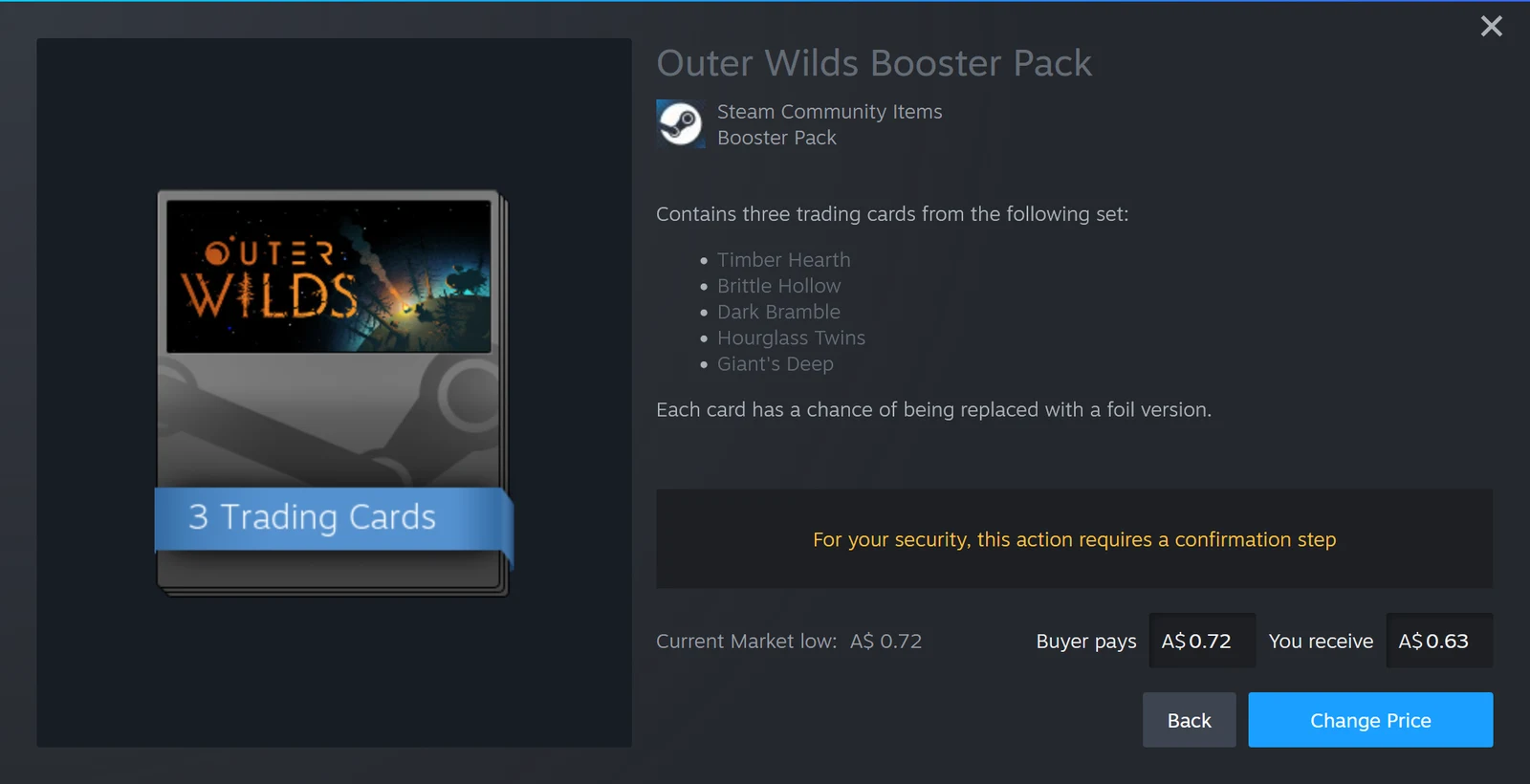
Repricing happens in a Change Price dialog. It shows the current Market low next to two price boxes, Buyer pays and You receive, so you can set either side. The dialog warns that "for your security, this action requires a confirmation step," so a new price has to be confirmed with Steam Guard like a new listing. Steam's fees still apply: in our test on a booster pack, a buyer price of A$0.72 left A$0.63 for the seller.
Valve hasn't said whether a repriced listing keeps its place in the queue of sell orders at the same price.
A Market section that knows your badges
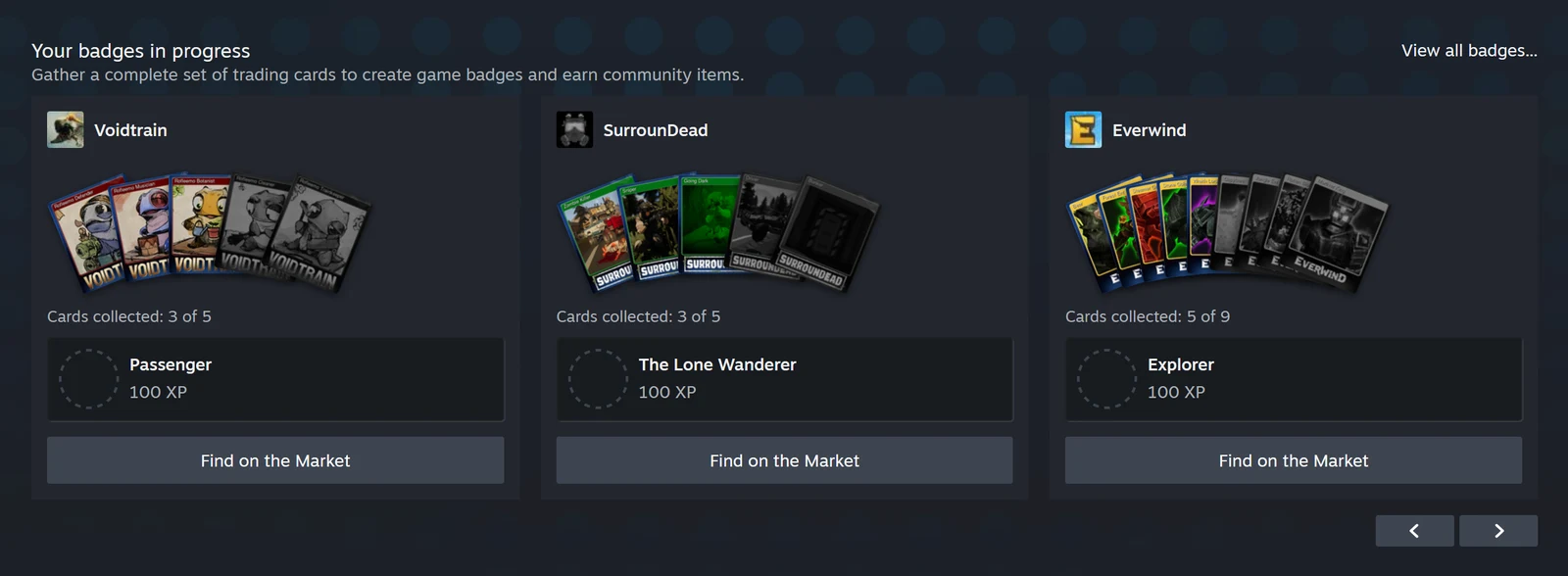
Market Home now has a Steam Community Items section with trading cards, emoticons and profile backgrounds from the games you play. Valve says that "if you have any badges in progress we'll feature them here, making it easy to pick up the remaining cards."
On the page it's a row called Your badges in progress. Each game in it shows how many cards you've collected (for example "5 of 9"), the next badge level and its XP, and a Find on the Market button.
That's useful if you craft badges. Card drops only cover about half of a game's set, so finishing a badge usually means buying the rest. Our guide to how Steam trading cards work explains why, and how to level up on Steam covers what each badge level is worth (100 XP).
Market fees after the update
Steam's own fee hasn't changed. Steam Support's Community Market FAQ still describes the Steam Transaction Fee as "currently 5% (with a minimum fee of $0.01)," paid by the buyer, plus a game-specific fee that the game's publisher sets. For Valve's own games, such as Team Fortress 2 and Counter-Strike 2, that fee is 10%.
What's new is on the developer side. Valve's announcement says that "for game items on the Steam Community Market, you can now configure a custom fee percentage for Market purchases, along an optional fee maximum for each sale." The announcement only mentions game items. It doesn't say whether the change touches Steam Community items such as trading cards, and Valve's Market FAQ hasn't been updated with any custom fees yet. Until it is, assume card fees work as before: our marketplace fees page shows how they add up on a cheap card.
Prices and fees decide what you receive, not how much you'll make. Card prices change daily and most cards sell for a few cents, so the update doesn't change how much selling cards is worth.
Watchlist, list view and the rest
The Watchlist saves things to check later, right from Market Home. You can save a specific listing, an item type with the filters you've applied, or a search with its text and filters. Entries can have custom names and you can reorder them. For card collectors, a saved search for one game's cards is a quick way to keep an eye on the cards you still need.
Search results and buy and sell listings now have a list view next to the card view, and Trending is a new sort option. If you buy or sell in the Steam Mobile App on the same phone as your Steam Guard Mobile Authenticator, the app now asks you to confirm in place instead of sending you to the Confirmations page.
Valve is collecting feedback on the new Market in the Steam Community Market discussions.
What this means for Steam Game Idler
Steam Game Idler's Inventory Manager lists items from your Steam Community inventory: trading cards, foil cards, emoticons, backgrounds and booster packs. It doesn't sell in-game items. Here's how the update fits with it:
- Fees: SGI works out each listing price so the buyer pays the price you enter, using Steam's 5% fee and the 10% game fee. Valve's new custom fees are described for game items, which SGI doesn't list, so nothing changes there as far as Valve has announced.
- Repricing: SGI doesn't edit listings. Its Remove listings button cancels every active listing at once, so if you only want to change one card's price, use Steam's new reprice option on the Market instead. To relist everything at new prices, remove the listings in SGI and list again.
- Badges: SGI already shows each card's badge level ("Badge level 2" or "No badge crafted"), with a Has badge filter and a Badge level sort, so you can keep the cards you'll need for a badge out of a bulk sale. Steam's new section works from the other direction, showing the cards you're missing.
- Prices: SGI fetches each item's highest buy order and lowest sell order from the Market. Its pricing details explain which one a bulk listing uses.
You still confirm SGI's listings with Steam Guard, the same way as listings you make on the website. Listing duplicate items automatically is part of the Gamer tier. Listing and removing items yourself is free. Download Steam Game Idler to try the Inventory Manager.
FAQ
Can you change the price of a Steam Market listing?
Yes, since November 23, 2026. Valve's Market update adds a Change Price option to live listings, so you don't have to remove the listing and list the item again. The new price needs a Steam Guard confirmation, just like a new listing.
Did Steam change its Market fees?
Steam's own Transaction Fee is still 5% (minimum $0.01), according to Steam Support's Market FAQ. The update lets developers set a custom fee for their game items, with an optional maximum per sale. Valve hasn't said the change applies to trading cards or other Steam Community items.
What is the Steam Market Watchlist?
A list of things you want to check again, shown on Market Home. You can save a specific listing, an item type with filters, or a search with its text and filters, give each a name and reorder them.
Is the new Steam Market only for Counter-Strike 2 items?
No. Valve used Counter-Strike 2 to build the new item pages, but the update covers the whole Market, including Steam Community items. More than 13,000 games have Steam Community items on the Market, according to Valve's May announcement.
How do I find the cards I need for a badge?
Check the new Steam Community Items section on Market Home, which features badges you have in progress. You can also open a game's badge page from your profile to see which cards you're missing.
Sources
- Valve, More Steam Community Market Updates, November 23, 2026.
- Valve, Steam Community Market Updates, May 12, 2026.
- Steam Support, Community Market FAQ, accessed November 26, 2026.
- Trading Cards
- Badges
Creator and maintainer of Steam Game Idler.